Written on 20 May 2013, 10:49pm
Tagged with: php, ubuntu
Getting out of your comfort zone is difficult. That’s why I decided to try it in a variety of ways. Becoming platform independent is one of it.
Since the first time I touched a computer, I worked with Windows. Then, in the university, I kind of had to work in Linux. I remember having Red Hat 7.3 for a brief period of time. Working in the web development put me in the situation to SSH to a remote web server in order to make changes in the server configuration. And that’s pretty much all my non-Windows experience. Oh, that and the time I spent in the Apple Stores trying out the MBAs. Which I loved, but never really thought buying one because of the price and lack of need.
Fast forward to this weekend – I decided to give Ubuntu a try. Except for my free time, nothing else was necessary.
Before I started, I was aware that it would be almost impossible to switch everything from Windows to Ubuntu. For instance – photography manipulation and backup, iDevices synchronization, play content to TV via allShare, bluetooth streaming to my home theater, and probably a few others which I don’t realize at the moment. But hey, small steps. For now, the goal was to move my PHP side-project environment from Windows to Ubuntu. Spoiler: it worked! 🙂
List of steps I performed:
– downloaded and wrote the Ubuntu 13.04 iso image on a bootable USB drive
– while downloading, learned about the Ubuntu release code names 🙂
– tried to install it two times from the bootable USB drive with persistent space
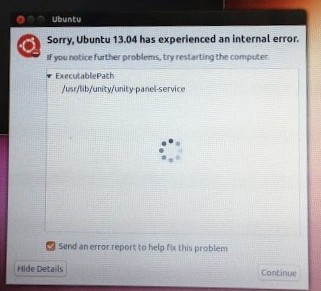
– encountered an unknown (for me) error:


– messed up the Grub boot loader while formatting the Ubuntu partition in Windows:

– using another computer (luckily I had one), I created again the bootable USB drive, this time without persistent space
– installed Ubuntu for the 3rd time:
– 
– this time it worked, only to find out that it installed a wrong driver for my wireless network card
– plugged in the network cable and spent a couple of hours on some geeky unix/ubuntu forums searching for the correct driver to install
– [end of day 1]
– turns out, trying to install Google Chrome on Ubuntu 13.04 is not a piece of cake. One must know the differences between Chromium and Google Chrome. Then, installing the official Google Chrome failed because of an error. Some more time to find out that the error is solved in the unstable, dev version. Install it and synchronize my Google Chrome account. Felt in a better place 🙂
– installed Vlad’s Roaring Railtail wallpaper. Felt in an even better place 🙂

– played for a little bit with the other usual suspects: Rhythmbox for music, VLC player for video, Shotwell for pictures, Transmission, GEdit, etc
– next – Sublime Text. No problems here, except for the general remark that instead of the familiar Windows ‘download-install-enjoy’ workflow, there is a ‘search-hack-pray-enjoy’ one.
– speaking of software installation and workflow – I only managed to use the Ubuntu Software Center to install Dropbox and Wine. For the rest, I either had to apt-get install, or add a PPA repository (Personal Package Archive).
– spent more than one hour trying to find an alternative to TortoiseSVN. I gave RabbitCVS a chance, but the installation process did not work as expected. It failed when trying to sudo apt-get install rabbitvcs-thunar: “The following packages have unmet dependencies:
rabbitvcs-thunar : Depends: thunarx-python (>= 0.2.0) but it is not installable
E: Unable to correct problems, you have held broken packages.“. Unfortunately, the Internets ran out of obscure/geeky/ubuntu forums to correct this problems and I gave up 😐
– I settled for a non-graphical SVN client instead: Sublime SVN. This guy is a genius, and not for this handy plugin, but for the Package Control itself.
– [end of day 2]
– installing the Lampp environment was easier than expected. Changing the default DocumentRoot was also fairly easy.
– after getting over some annoying PHP error reporting problems in PHP 5.4, I was able to do my first commit from Ubuntu and deploy it using DeployHQ
– felt like cheating for using Wine for Total Commander and Beyond Compare 🙂
– finally, installed Dropbox from the Ubuntu Software Center. Didn’t try Ubuntu One; Dropbox, Google Drive and Crashplan fulfill all my cloud needs 🙂
Documentation:
– Ubuntu-Manual.org
– The Official Ubuntu Book (2012)
Still to be done:
– mouse buttons configuration: I am using for more than 5 years a Logitech VX Nano (actually I have 3 pieces 🙂 ) and I really got used to the ‘minimize’ button shortcut. Logitech does not provide Ubuntu drivers, and a quick search for ‘xinput set button map’ did not help. Still digging – but if I can’t make it work, it’s ok. Stepping outside the confort zone even more 🙂 Moreover, the middle button still works.
– Google Chrome mouse gestures: I am using this Chrome extension for the mouse gestures. It works fine in Windows, but it fails miserably in Ubuntu
– install Skype
– find a dlna server as alternative to allShare (serviio?)
– find a bluetooth streaming Ubuntu alternative
Conclusions:
– the software distribution and installation in Ubuntu is a pain. I’m not saying that the ‘download-install-autoupdate-enjoy’ Windows workflow is perfect, but the current Ubuntu alternative needs improvements (to say the least). I personally think that this is the main reason why it keeps people away. Installing a web browser should be a task that can be accomplished by a 10-years old, not by an an adult with reasonable computers experience digging some obscure forums to install an unstable release.
– OS installation is generally ok (I tend to believe that my problems were caused from my local setup). This is a one-time process and people are more forgiving in this case, but…
– the driver detection can be improved. Installing Ubuntu only to find out that it doesn’t recognize your wireless card is a no-no. Both Linux and Windows worlds are, by design, pretty far from the ‘walled-garden’ and its ‘it just works’ mantra
– so far I have mixed feelings about my Ubuntu experience. One one hand I appreciate the general look and feel, speed and, well, price. On the other hand, I find it intimidating, especially when installing new things. But one thing is clear: I am not giving up. And for the moment I don’t feel the need to go back to Windows.